
Connecting Alumni to Their Next Course: A Recommendation-Based Digital Badge System
Kolleges' admin-configured related-badge feature plus a built-in 1/3/7-day notification cadence turns badge earners into repeat enrollees - no external CRM required.
The era of “personalized recommendation” based on outcomes
Of the many programs an educational institution offers, which one fits a given learner best?
Today, a recommendation structure powered by “performance data” has become a more powerful connection tool than an ad budget.
The digital badge-based outcome sharing automation in Kolleges makes this kind of “outcome-driven connection” possible.
In this article, we’ll focus on one of the core capabilities - recommended badge configuration and notification message recommendations - and walk through how it drives a learner’s next action and improves conversion efficiency for institutions.
What Are Related Digital Badges and CRM Automation?
The recommended-badge feature is not simply a structure that “shows similar-looking badges.”
In Kolleges, the institution can set related badges directly from the admin page.
When an administrator pre-registers related courses, next-tier badges, and advanced-course badges for each badge, the recommended badges are always displayed on the badge detail page for any learner who has earned that badge.
In other words, instead of an automatic algorithm, it is the curriculum-linked structure designed by the institution that is reflected directly.
For example, if an administrator links the “Korean Society of Polar Medicine Conference Certificate” badge to the “Korean Society of Polar Medicine Associate Member” badge, a learner who earned the former can instantly see the “next-stage course” on the detail page.
Similarly, by connecting the “UX Prototyping in Practice” badge to the “Design Thinking Workshop” badge, you can design a flow where learners naturally progress to advanced education.
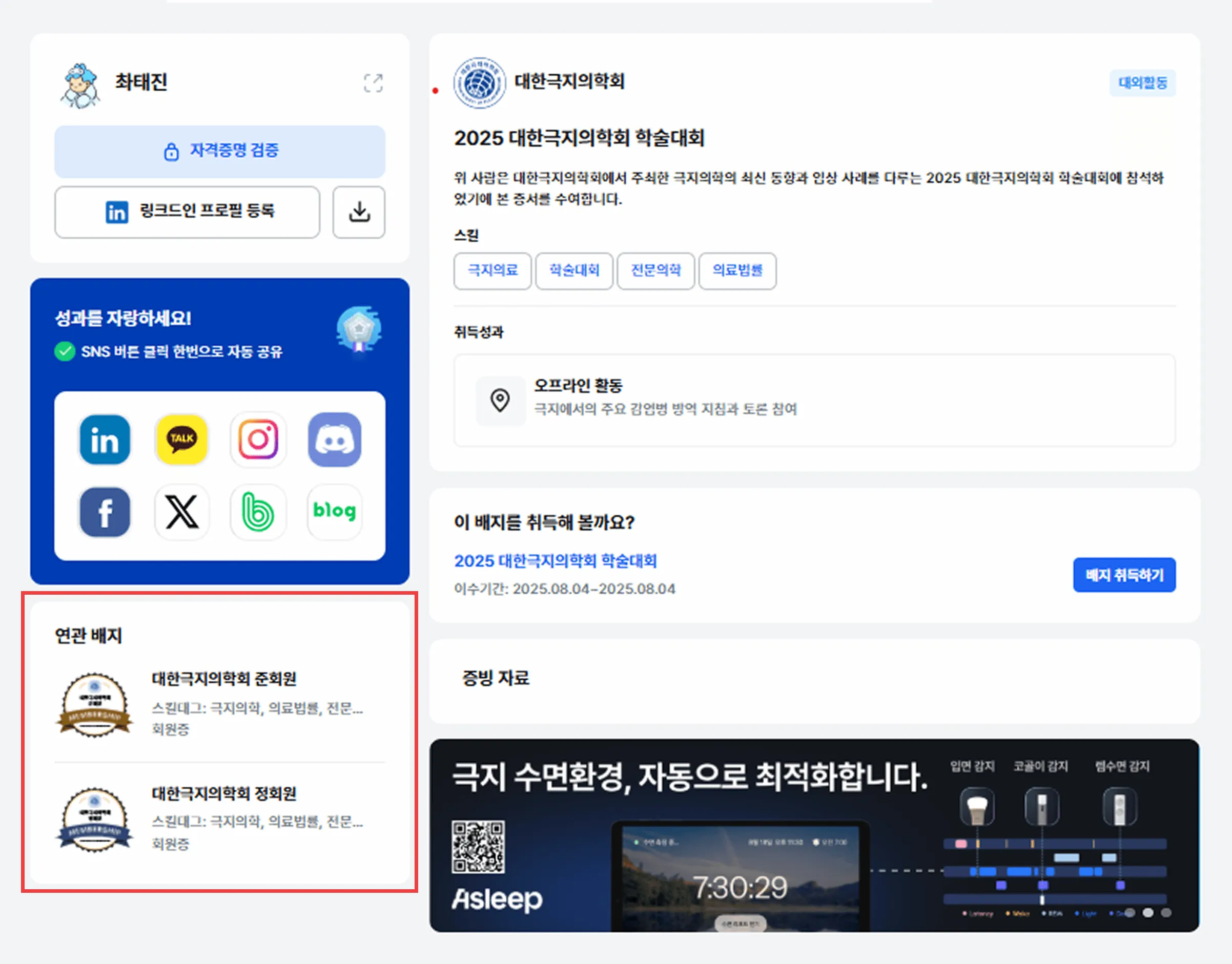
In this way, the recommended-badge feature becomes a tool the institution can use to design its own outcome-based learning journey, easily structuring the flow from outcomes to the next course.
Automatic Notification Messages Recommending New Courses After Digital Badge Issuance
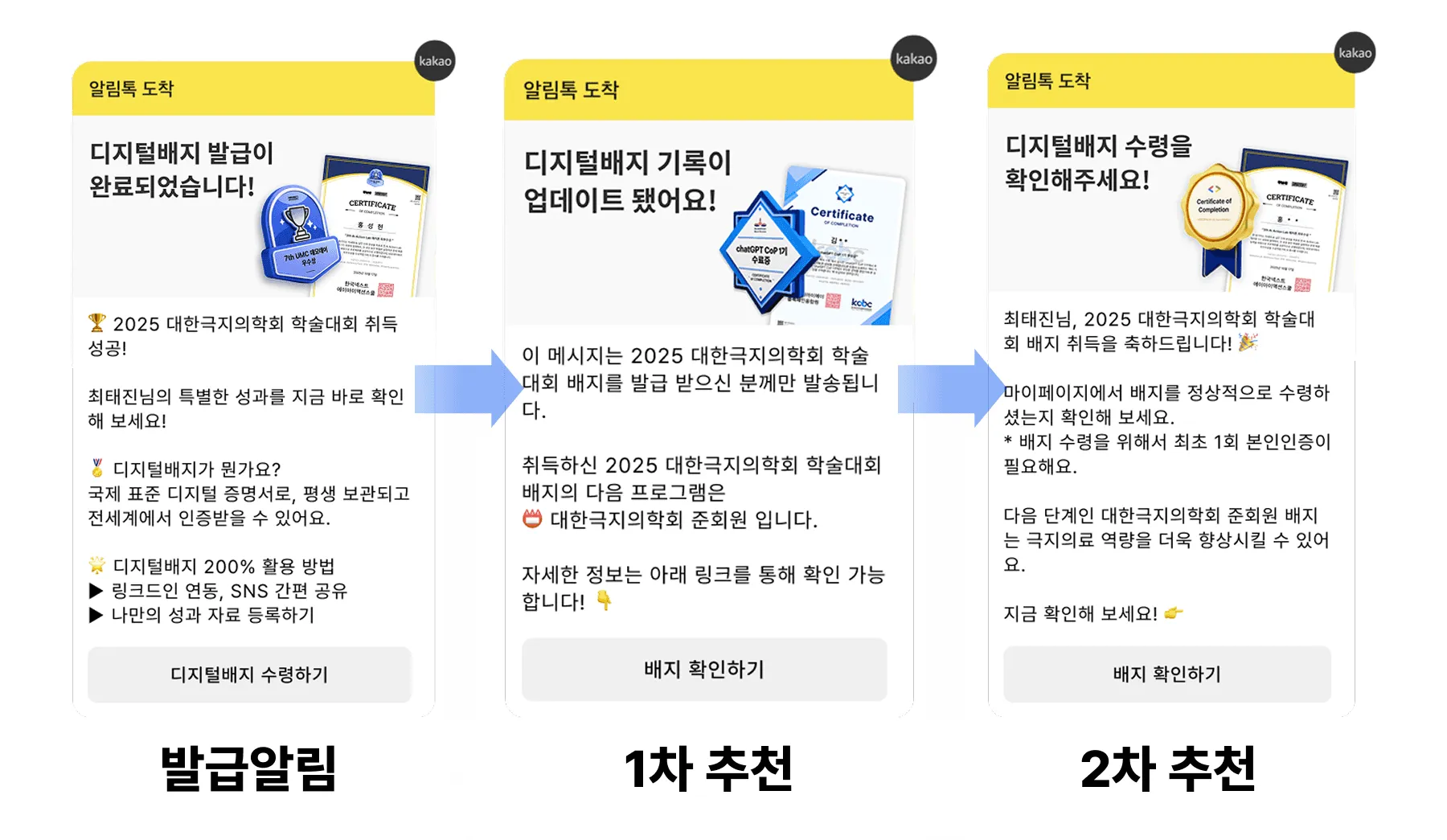
The moment a learner receives a digital badge after course completion, the system immediately sends a first notification message announcing the badge issuance and the verification link.
This message reinforces the learner’s sense of accomplishment right after completion and naturally encourages them to share their badge on social media.
Three days later, a second notification message is automatically sent introducing the next-stage course (configured in advance by the administrator) for that program.
This is the window during which the learner still has interest in and engagement with the program - the perfect timing to stimulate re-enrollment intent.
Finally, seven days later, a third notification message reintroduces the same related course one more time.
In the end, this 1→3→7-day messaging cadence forms an automated education connection loop of “badge issuance → achievement sharing → next-course guidance → re-enrollment.”
Institutions can drive sustained re-engagement through digital badge issuance alone, without a separate CRM (Customer Relationship Management) system or ad tool.
Through this feature, the structure of “outcome → course recommendation → re-engagement” is completed.
Two Effects of the Digital Badge Recommendation Feature
1. Higher Conversion Through Data-Driven Personalized Recommendations
Traditional ad-style outreach targets an unspecified mass, but the recommended-badge feature provides recommendations tied to each individual learner’s outcomes.
Because these are proposals aligned with the user’s actual interest and learning goals, both click-through rate (CTR) and new-course enrollment conversion rate rise noticeably compared to advertising.
2. Automated Re-engagement Without a CRM
Personalized recommendation structures typically require a separate CRM (Customer Relationship Management) system, automation tool, or a large-scale data pipeline.
But Kolleges’ recommended-badge and notification message recommendation feature plugs directly into digital badge issuance data,
so automated recommendations are available immediately without external systems or API integrations.
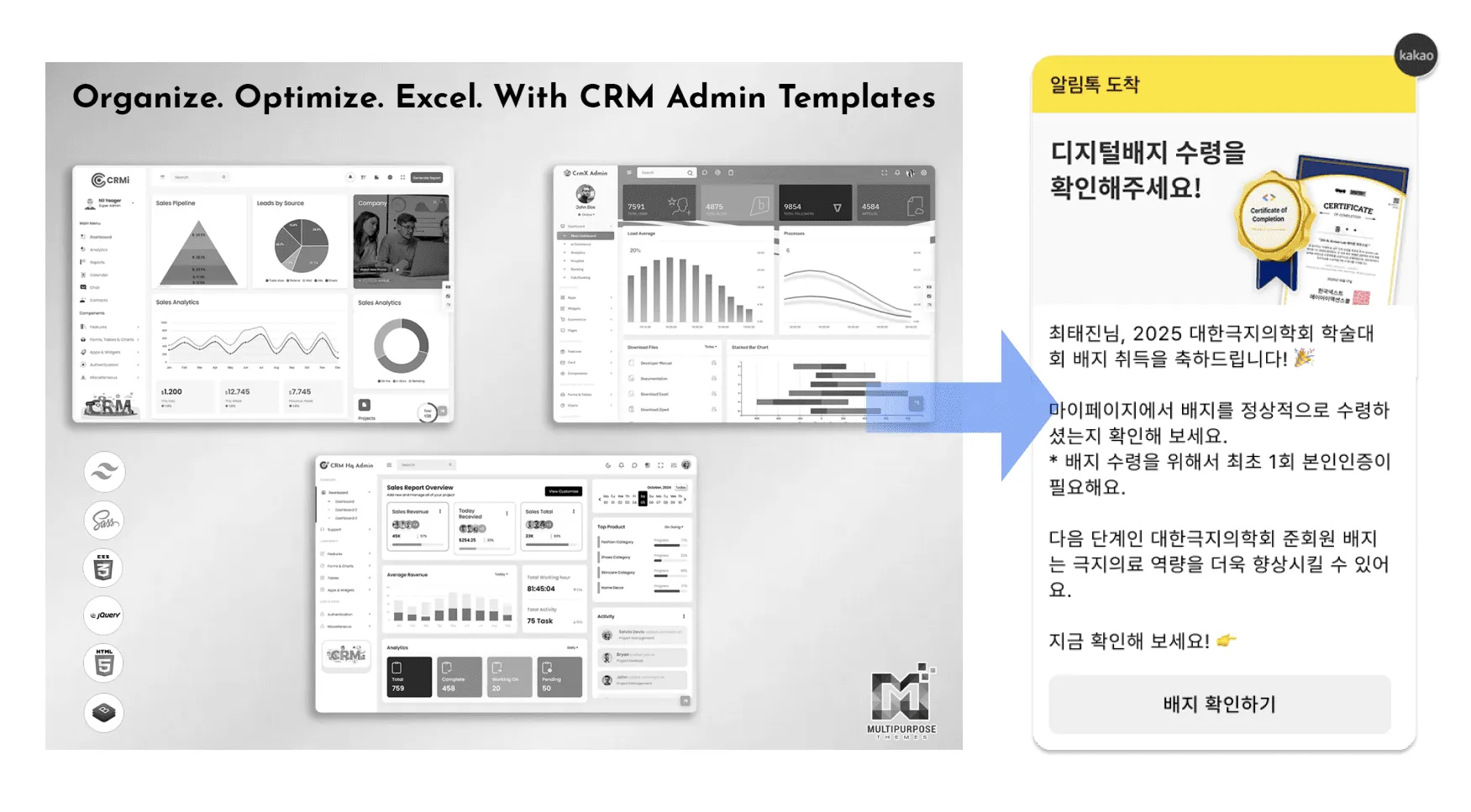
Education staff can configure which recommended badges to display from a simple admin screen, and run a sustained outcome-driven connection structure without technical barriers.
Two Linked Features Inside the Digital Badge Page That Amplify Outcome Sharing Reach
The Kolleges recommendation feature is powerful on its own, but used together with the two features below, product exposure and purchase conversion increase dramatically.
1. Custom Ad Banner Feature
Badge detail pages are visited not only by learners but also by recruiters, peers, and external partners.
Institutions can insert a custom banner in this space and link it to any web page they wish.
- Education Detail-Page Integration to Drive Prospective Learner Enrollment

At the bottom of each digital badge detail page, you can display a direct enrollment link for the course that grants the badge.
Through this, visitors experience the journey of “outcome → course → enrollment,” and from the institution’s standpoint, registration can be driven directly from the page.
How to Register Related Badges for New-Course Recommendations
Recommended badges are a core feature that connects learners - after completion - to the “next-stage education” they will see.
The outcome sharing automation feature of Kolleges can be configured directly inside the admin page.
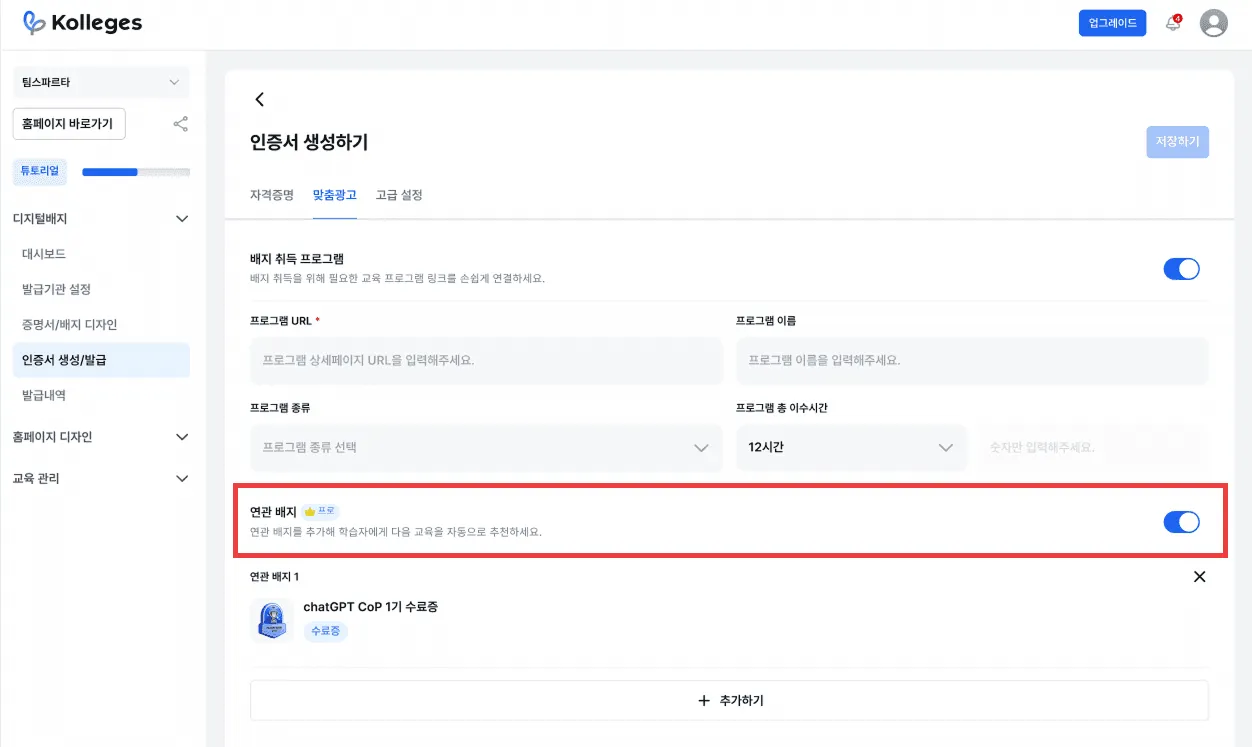
The configuration steps are as follows.
- 1 Go to Admin page → select the [Create Certificate] tab
- 2 Go to the [Related Badges] section - Under the [Custom Ads] tab.
- 3 Add the badges you want to recommend
- 4 Optionally toggle ON/OFF
- 5 Save - The change is immediately reflected - always visible on the learner's badge detail page.
Using this feature, you can naturally connect learners to the next learning opportunity along the curriculum flow designed by the institution.
With a single click, alumni can enroll in the next course or continue into a higher-tier program, so the institution naturally guides existing learners into their next course without separate advertising.
Connecting Course Enrollment Links to Drive Prospective Learner Acquisition
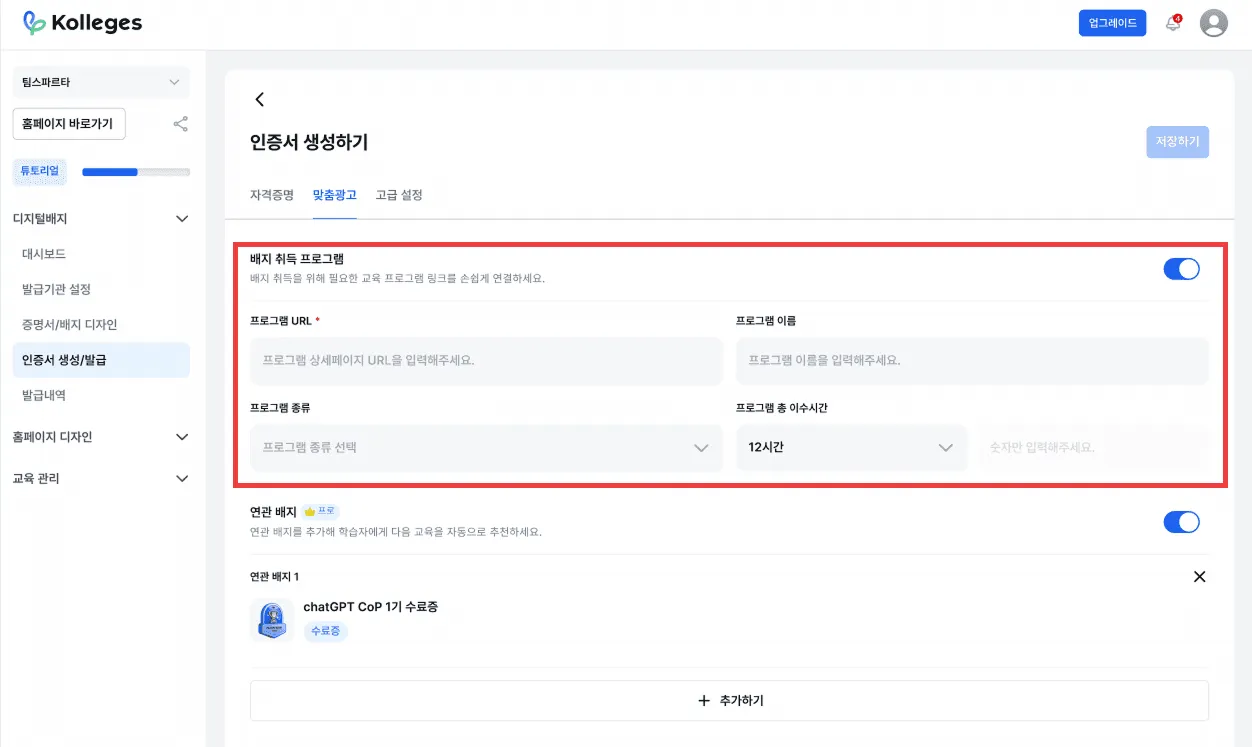
Institutions can configure a “Course Enrollment Link” to direct visitors of the digital badge page to the course enrollment page.
Setup steps:
- 1 Go to Admin page → select the [Certificate Create/Issue] tab
- 2 Go to [Custom Ads] - At the bottom of the page.
- 3 Enter the following fields - Program type (e.g., education program, degree program), Program name (the official name of the course), Program URL (the address of the enrollment page the learner will go to, required), and Completion period (the duration of the program).
- 4 After entering all fields, click [Save]
The information entered is automatically displayed at the bottom of the badge’s detail page, and the link button connects directly to the course.
This feature provides an instant conversion path (Conversion Path) that completes outcome exposure and conversion driving in a single flow.
In other words, when alumni share their badges on social media, the same link is preserved, leading to a natural inflow of new prospects.
A New Structure for Connecting Educational Institution Outcomes
“Education that doesn’t stop at outcomes - a growth structure that leads to the next engagement.”
Digital badges are evolving beyond a simple completion certificate into a follow-on course channel that proposes the next learning journey to learners.
The recommended-badge feature in Kolleges keeps the relationship with the learner intact after completion and naturally guides them toward higher-tier programs, advanced courses, and related programs.
Even without adding ad spend, a structure is completed in which alumni become the next customers.
Now, student recruitment at educational institutions is moving beyond “acquisition” into an era of designing what happens after the outcome.
Use recommended badges to support your learners’ growth and simultaneously raise your institution’s sustained engagement rate and revenue.
Education where the outcome is the starting point, not the end - with digital badges at its core.
Frequently asked questions
Want to turn learning outcomes into verifiable assets?
From issuing to verifying and amplifying, see it for yourself with Kolleges.
Request a Kolleges demo
Related posts

Automated Outcome Sharing, Built with Digital Badges | When Completion Leads to the Next Course
Digital badges automate outcome sharing by turning every graduate share into an ongoing discovery loop - complete with custom ad banners, recommended next courses, and one-click sharing to 8 social networks.

2025 Student Recruitment Trends: 7 Practical Strategies Every Education Institution Must Know
In 2025, education institutions win enrollments by combining CRM-driven funnel management, platform social proof, and digital badge sharing into a single data-grounded recruitment engine.

A New Answer for Education Institution Branding: How to Survive in the Adult Job Training Market
Digital badges transform learner achievements into organic brand proof, helping adult job training institutions build trust and stand out in a crowded, fast-growing market.