
Plan Upgrade Guide: How to Manage Payments and Subscriptions
 Robin Yoon · Customer Success Team Published
A clear overview of the entire subscription management process admins need to know, from the Kolleges Starter, Pro, and Premium plan upgrade steps to reviewing payment history and changing cards.
This guide explains in detail how to change your Kolleges plan, upgrade your plan, and manage subscription payments. It also provides criteria for choosing a plan that fits your organization’s size and operational goals.
Plan Upgrade
In Plan Upgrade, you can set the plan and issuance limit tailored to the size and nature of your organization or company.
- The Pro/Premium plans are available on an annual contract only.
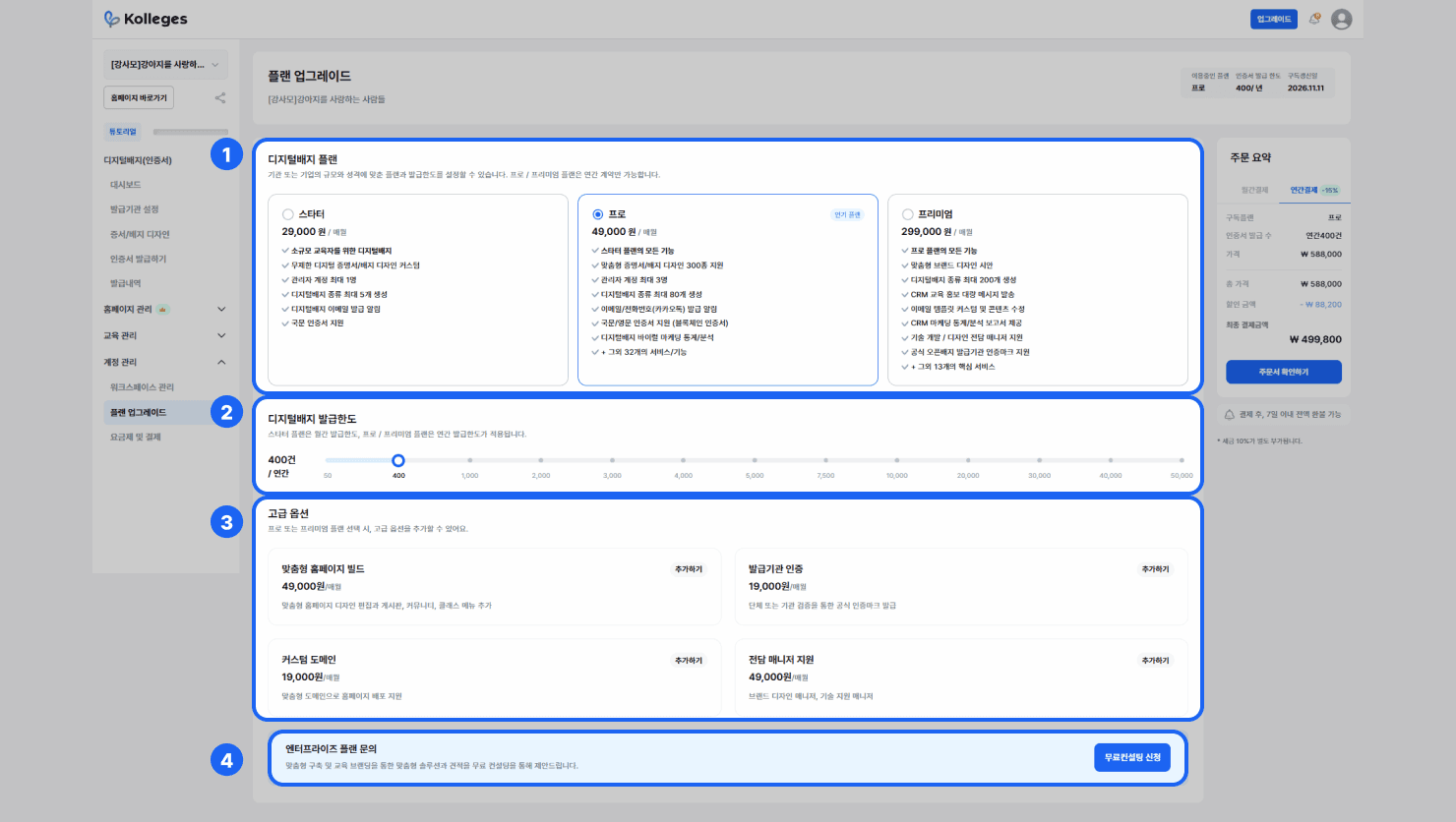
- Digital Badge Plan: You can review the features and prices of the Starter/Pro/Premium plans.
- Digital Badge Issuance Limit: You can set the number of digital badges that can be issued monthly/annually.
- The issuance limit you set is reflected in the order summary on the right.
- Advanced Options: Review and add the advanced options that can be added on the Pro/Premium plans.
- Custom Homepage Build: Custom homepage design editing and adding board, community, and class menus
- Issuer Certification: Official certification mark issuance through organization or institution verification
- Custom Domain: Support for deploying your homepage on a custom domain
- Dedicated Manager Support: Brand design manager and technical support manager support
- Enterprise Plan Inquiry: Through a free consultation, you can receive guidance on a solution and quote based on custom implementation and education branding.
Pricing & Payment
You can review your pricing plan, payment history, and payment information.
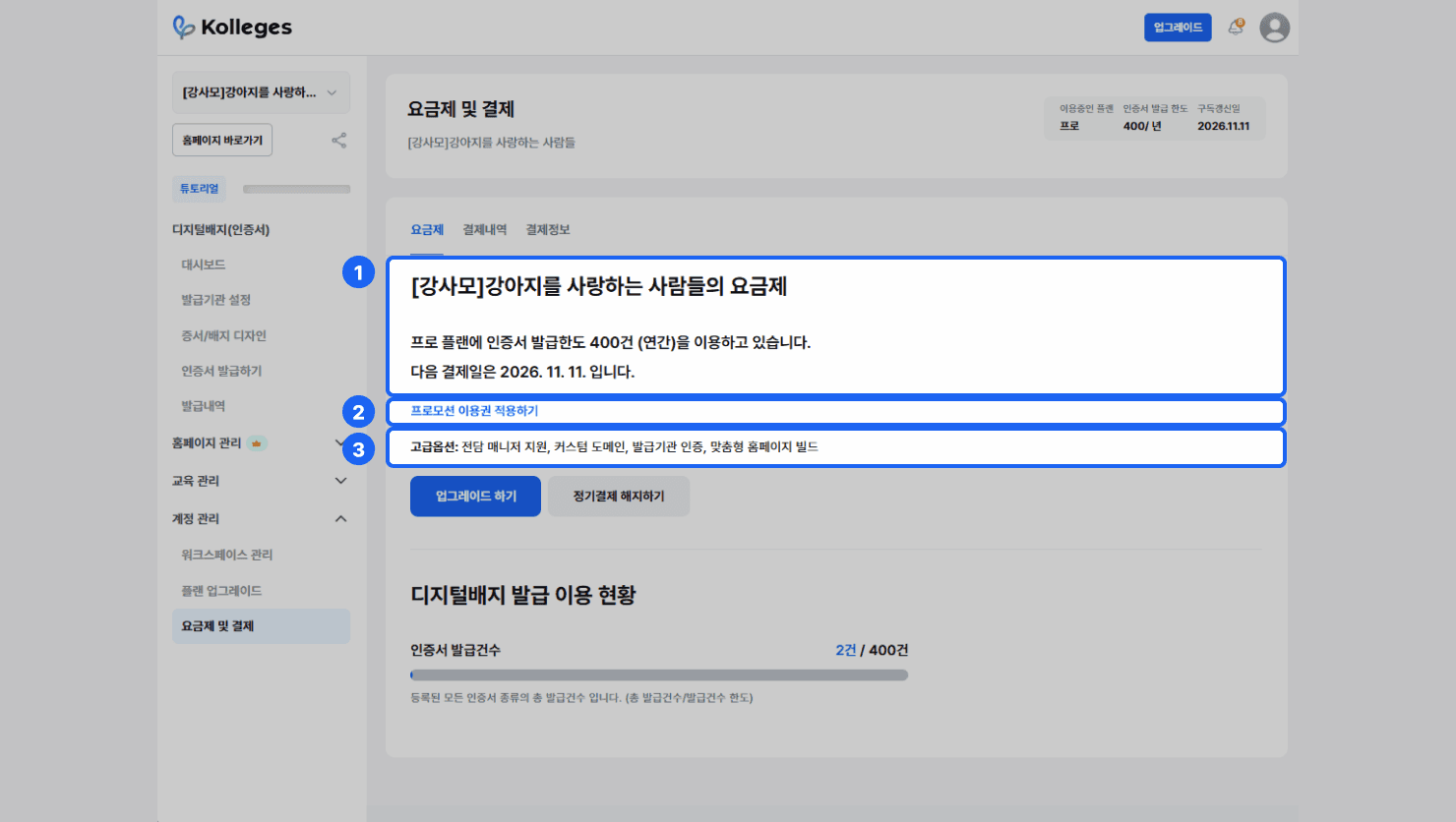
Pricing Plan: You can review information about the plan you are currently using.
- ① Plan Details: You can check the plan you are using, the digital badge issuance limit, and your next payment date.
- ② Apply Promotion Voucher: If you have been provided a usable promotion voucher, you can enter the 12-digit voucher code and apply the promotion voucher starting the following month.
- ③ Advanced Options: You can review the details of the advanced options currently applied.
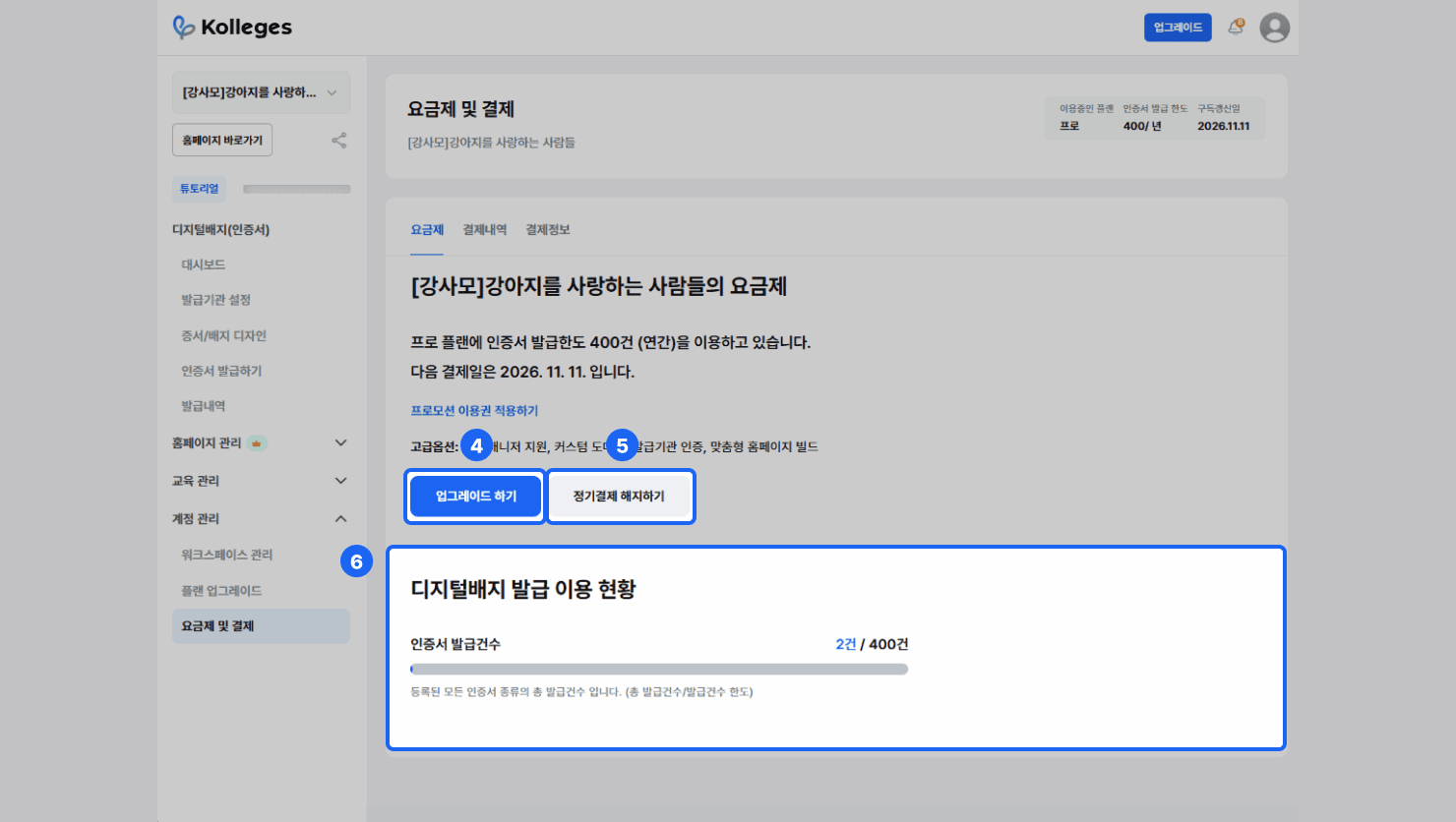
- ④ Upgrade: Moves to the digital badge plan upgrade screen.
- ⑤ Cancel Recurring Payment: Cancels recurring payment for your plan. You can continue using the existing plan features until before the next recurring payment date.
- ⑥ Digital Badge Issuance Usage Status: Check the total number of digital badges issued and the digital badge issuance limit.
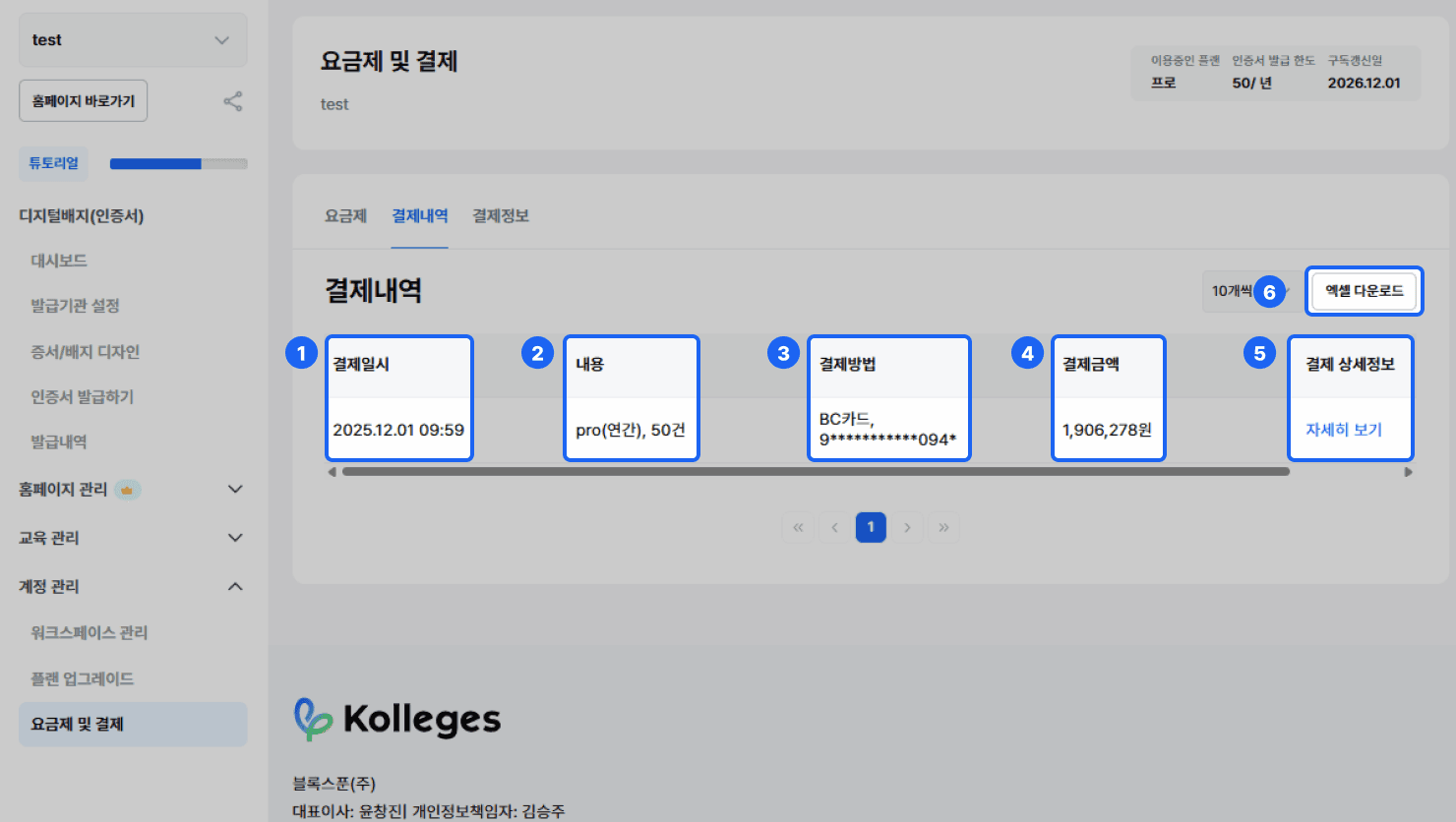
Payment History: You can review your plan payment history.
- ① Payment Date and Time: You can check the date and time of your plan payment.
- ② Details: You can check the plan you are using and the digital badge issuance limit.
- ③ Payment Method: You can check the card company and the last 4 digits of the card number used for payment.
- ④ Payment Amount: You can check the total payment amount.
- ⑤ Payment Details: Through View Details, you can view the payment confirmation statement.
- ⑥ {Excel Download}: You can download your payment history as an Excel file.
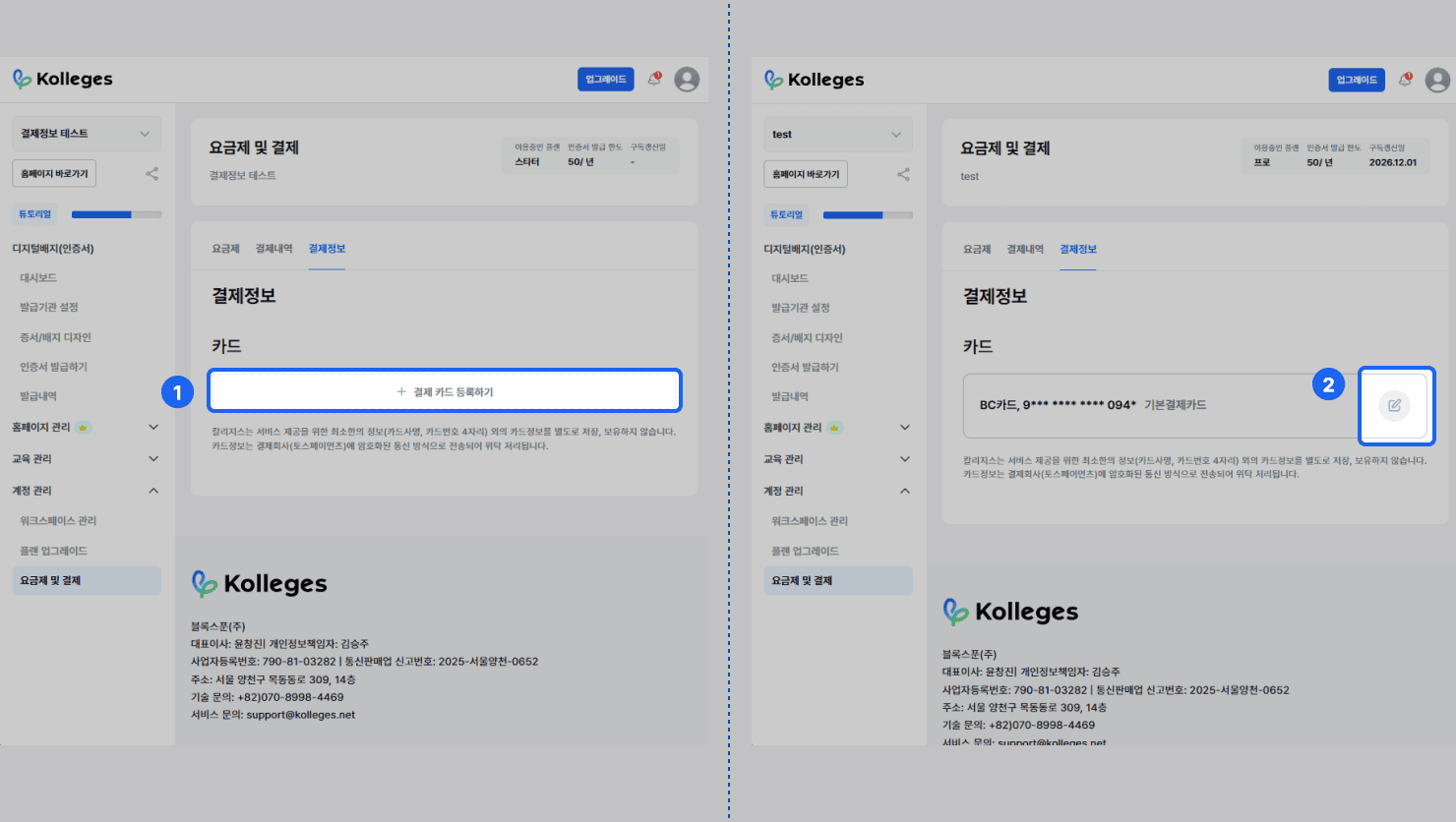
Payment Information {+ Register Payment Card}: You can register a card for recurring plan payments.
- Kolleges does not separately store or retain any card information other than the minimum information required to provide the service (card company name, last 4 digits of the card number).
- Card information is transmitted to the payment company (Toss Payments) via encrypted communication and processed under entrustment.
- ① {+ Register Payment Card}: You can register a payment card.
- ② {Edit Icon}: You can change the payment card.
Frequently asked questions
Want to turn learning outcomes into verifiable assets?
From issuing to verifying and amplifying, see it for yourself with Kolleges.
Request a Kolleges demo Related posts

Payment & Application Management Guide: How to Manage Enrollment Applications and Payment History
A clear overview of the practical workflow every Kolleges operator should know, covering payment and application history lookups, partial and full refund processing, and Excel settlement exports.

Custom Domain Address
This guide covers the 9-step DNS configuration procedure (adding A and CNAME records) for connecting an organization-owned domain as your homepage address in Kolleges, as well as how to disconnect it.

Add/Remove Admin Accounts
A step-by-step guide to inviting and removing admins by email in your Kolleges workspace, and adjusting permissions by enabling or disabling them without deleting the account.